
Introduction
Building a working robot prototype is hard. Operating a fleet of production robots across multiple customer sites is even harder. In a lab, engineers can attach debug cables, restart nodes manually, and monitor physical behavior directly. In production, robots operate in dynamic environments like distribution centers, factory floors, and hospital corridors. They lose Wi-Fi connections, run low on battery, hit physical obstacles, and run code written by distributed teams.
When machines leave the research lab and enter commercial facilities, traditional software management practices break down. You cannot treat a 200-kilogram autonomous mobile robot the same way you treat a cloud microservice. If a cloud server crashes, an orchestrator restarts it in milliseconds. If a physical robot loses state or experiences motor faults while carrying heavy cargo, it stops in an aisle, blocks traffic, or creates safety hazards.
This operational reality led to the emergence of RobotOps, short for Robotics Operations. RobotOps applies software engineering, continuous delivery, telemetry collection, and fleet reliability practices to physical machines. This guide covers how RobotOps works, how it bridges the gap between software and hardware, and how teams manage robot fleets at scale.
       +-----------------------------------------------------------+
       |             Robotics Operations Center (ROC)             |
       |  - Centralized Telemetry    - Over-the-Air (OTA) Updates  |
       |  - Health & State Alerts    - Incident Response Engine    |
       +-----------------------------+-----------------------------+
                                     |
                       Secure Telemetry & Control Link
                      (MQTT / Zenoh / DDS over VPN)
                                     |
           +-------------------------+-------------------------+
           |                                                   |
           v                                                   v
+-----------------------+                           +-----------------------+
|  Mobile Fleet (AMRs)  |                           | Industrial Workcells  |
| - Navigation / Nav2   |                           | - Fixed Manipulators  |
| - Dynamic Obstacles   |                           | - PLC / Safety Relays |
| - Battery Telemetry   |                           | - Deterministic Tasks |
+-----------------------+                           +-----------------------+
What Is RobotOps?
RobotOps is a set of engineering practices that link robotics software development with operational fleet management. It adapts modern DevOps principles to machines that operate in the physical world. Instead of stopping when code compiles or passes a simulation test, RobotOps covers the entire working lifespan of every deployed machine.
The goal is simple. Teams need to deploy updates safely, monitor system health remotely, detect failures early, and resolve incidents without sending field technicians on site every day.
The Shift from Development to Daily Operations
Historically, robotics projects followed slow, isolated release cycles. Engineers spent months tuning motion planners, calibrating perception sensors, and testing safety switches. Once installed at a facility, the software remained frozen for as long as possible. Teams avoided updates because manual testing was painful, and unexpected bugs could damage equipment.
This static approach fails when companies scale. Modern autonomous fleets require continuous improvements. Perception models need updates to handle new lighting conditions. Planners need tuning to improve throughput. Operating systems require security patches. RobotOps provides the automation, testing pipelines, and telemetry needed to make updates routine rather than risky.
How RobotOps Differs from Traditional DevOps
DevOps focuses on software running on standardized cloud servers or virtual containers. RobotOps must handle software tied directly to physical actuators, sensors, and unpredictable operating spaces.
| Dimension | Traditional Cloud DevOps | RobotOps (Robotics Operations) |
| Compute Environment | Homogeneous cloud servers or containers | Heterogeneous edge compute boards, microcontrollers, and GPUs |
| Failure Impact | Dropped network packets, HTTP 500 errors | Stopped machines, blocked physical aisles, potential hardware damage |
| Network Stability | High bandwidth, redundant wired connections | Variable, intermittent Wi-Fi or cellular connections |
| Deployment Mechanism | Rolling container updates, blue-green cloud routing | Over-the-Air (OTA) updates requiring physical safety checks |
| Rollback Complexity | Instantaneous routing swap | Complex; requires firmware, calibration, and state validation |
| Telemetry Volume | Text logs, structured metrics, trace headers | High-bandwidth point clouds, camera streams, sensor frequencies |
Core Pillars of Robotics Operations
Running robots reliably requires balance across four operational pillars: lifecycle management, telemetry, remote diagnostics, and environment configuration.
+-----------------------------------------------------------------+
|                   Core Pillars of RobotOps                      |
+-----------------------------------------------------------------+
| 1. Software Lifecycle    | Automated CI/CD, containerized runs, |
|                          | staged rollouts, instant rollbacks.  |
+--------------------------+--------------------------------------+
| 2. Fleet Telemetry       | Edge filtering, heartbeat metrics,   |
|                          | real-time alerts, distributed logs.  |
+--------------------------+--------------------------------------+
| 3. Remote Diagnostics    | Secure shells, network-aware traces, |
|                          | replay bags, safe remote control.    |
+--------------------------+--------------------------------------+
| 4. Environment Config    | Dynamic map distribution, keep-out   |
|                          | zones, sensor calibration manifests. |
+--------------------------+--------------------------------------+
1. Software Lifecycle and Deployment
A robot runs diverse software layers. A typical mobile system runs microcontrollers for low-level motor loops, an embedded Linux operating system, middleware packages like ROS 2, and high-level application code.
RobotOps establishes clear release pipelines across these layers:
- Containerization: Running robotics applications inside isolated Linux containers helps keep dependencies consistent across developer workstations, simulation engines, and physical machines.
- Staged Deployments: Never push an update to an entire fleet at once. Teams roll out updates using canary strategies: update one robot, monitor its performance for several shifts, update a small group, and finally update the entire facility.
- Automated Rollbacks: If an updated node crashes repeatedly or reports high localization errors, the system must drop back to the last known working image without manual human intervention.
2. Telemetry and Fleet Observability
Robots produce massive amounts of raw data. A single LiDAR sensor can generate tens of megabytes of point cloud data every second. Cameras produce dense video feeds. High-rate control loops publish sensor readings at hundreds of Hertz.
Transmitting all this data to the cloud over mobile networks is expensive and impractical. RobotOps solves this with edge telemetry processing:
- Heartbeat Metrics: Low-bandwidth indicators sent every few seconds. These include battery state of charge, motor temperatures, Wi-Fi signal strength, and navigation states.
- Edge-Filtered Logs: Warnings and errors stay buffered on local storage. Only critical events stream immediately to central monitoring systems.
- On-Demand Diagnostics: When an anomaly occurs, the platform requests specific diagnostic topics or short sensor recordings for offboard analysis.
3. Remote Diagnostics and Safe Intervention
When an autonomous machine halts, engineers must determine why without walking onto the factory floor. Remote observability tools allow operators to inspect process tables, active ROS nodes, transform trees, and sensor health flags.
If an autonomous mobile robot encounters an unmapped obstacle, safe recovery options are necessary:
- Assisted Waypoint Clearing: An operator views a low-framerate camera stream and issues a new navigation target to guide the robot around an obstacle.
- Virtual Estop: A verified, secure network command that halts all motor drives if an unsafe condition is detected.
- Safe State Fallbacks: If a network connection drops completely during an operation, the robot must safely decelerate to a stop and engage mechanical brakes.
4. Configuration and Environment Management
Robots do not operate in static software bubbles. They interact with physical workspaces that change constantly. Warehouse layouts shift, construction sites change daily, and sensor alignments drift due to mechanical vibration.
RobotOps manages site maps, sensor calibration matrices, and operational rules as version-controlled configurations. When an operator updates a “keep-out zone” in a facility map, the fleet management system distributes that map update to every active robot in the sector before their next dispatch cycle.
The Role of Robot Simulation in RobotOps
Physical hardware testing is slow, resource-intensive, and carries mechanical risk. If an engineer introduces a bug into a motor drive controller, physical tests might damage hardware or workcells. Robot simulation acts as the continuous integration (CI) layer for RobotOps.
+-----------------------------------------------------------------+
|              Simulation and CI/CD Verification Loop             |
+-----------------------------------------------------------------+
|  Code Commit (Git)                                              |
|         |                                                       |
|         v                                                       |
|  Headless Simulation (Gazebo / Isaac Sim)                       |
|  - Physics verification & collision checks                      |
|  - Synthetic sensor fuzzing (noise, dropped packets)            |
|         |                                                       |
|         v                                                       |
|  Hardware-in-the-Loop (HIL) Rig                                 |
|  - Embedded target validation (Jetson, microcontrollers)        |
|  - Thermal, CAN bus, and interface checks                       |
|         |                                                       |
|         v                                                       |
|  Canary Release -> Fleet Rollout                                |
+-----------------------------------------------------------------+
Virtual Verification Before Physical Rollout
Modern teams use simulators like Gazebo, O3DE, or NVIDIA Isaac Sim within automated testing pipelines. When a developer submits a pull request:
- A headless simulation container boots in a cloud environment.
- The virtual robot spawns inside a digital model of the deployment facility.
- The platform executes navigation tests, docking maneuvers, and obstacle avoidance routines.
- If the planner exceeds safety tolerances or causes a virtual collision, the pipeline halts the release.
Simulations do not eliminate the need for physical tests. Real friction, lighting variations, and sensor noise always differ from synthetic models (the “sim-to-real gap”). However, simulation eliminates obvious logical regressions before code ever touches an actual motor controller.
Software-in-the-Loop and Hardware-in-the-Loop Testing
Mature RobotOps pipelines use two distinct testing tiers:
- Software-in-the-Loop (SIL): The complete robotics software stack runs entirely in a virtual environment. This tests high-level path planning, state machines, and business logic quickly across dozens of simulated scenarios in parallel.
- Hardware-in-the-Loop (HIL): Production code compiles and runs on physical compute targets (such as industrial single-board computers or NVIDIA Jetson modules) connected to simulated hardware interfaces. This verifies real-world compute limits, thermal behaviors, CAN bus timings, and memory limits before field deployment.
Robot Fleet Management in Practice
Managing an individual robot requires solid control theory and systems programming. Managing fifty or five hundred machines requires a dedicated fleet orchestration platform. Robot Fleet Management coordinates the actions, health, and software lifecycles of multiple robots working toward shared operational goals.
       +---------------------------------------------------+
       |              Fleet Management System              |
       |  - Mission Dispatcher     - Traffic Arbitrator    |
       |  - Battery Scheduler      - Firmware Registry     |
       +-------------------------+-------------------------+
                                 |
         +-----------------------+-----------------------+
         |                       |                       |
         v                       v                       v
+-----------------+     +-----------------+     +-----------------+
| Robot Alpha     |     | Robot Beta      |     | Robot Gamma     |
| Task: Transport |     | Task: Charging  |     | Task: Idle/Hold |
| Bat: 88% | OK   |     | Bat: 24% | Chg  |     | Bat: 94% | OK   |
+-----------------+     +-----------------+     +-----------------+
Fleet Health and Battery Management
Batteries are consumable assets that govern fleet productivity. A fleet manager must monitor cell health, charge cycles, temperature, and discharge curves.
If every robot returns to chargers at the same time, operations halt. Fleet scheduling software models task priority against battery levels. It staggers charging windows, routes low-battery units to available charging docks automatically, and preserves overall system throughput.
Traffic Control and Work Order Distribution
When multiple mobile robots share narrow factory corridors, deadlocks occur without coordination:
- Spatial Reservation: Fleets use central orchestrators to reserve corridor segments and intersections, preventing two robots from entering a dead-end aisle facing each other.
- Dynamic Task Assignment: When an automated warehouse receives an order, the fleet manager identifies the optimal robot based on proximity, battery reserves, payload capacity, and current workload.
Over-the-Air (OTA) Updates and Safe Rollbacks
Updating robots over the air requires defensive software engineering. Unlike a smartphone, a robot cannot restart while driving down an incline or carrying fragile goods.
An effective RobotOps deployment system enforces strict preconditions before applying updates:
- The robot must be stationary and docked at a charging station.
- Payload sensors must confirm the machine is not carrying cargo.
- Battery charge must be above a safe threshold (often 50% or higher).
- The robot must be taken out of the dispatch pool until self-tests pass.
Modern deployments frequently use A/B root file system partitioning. The system writes the new software image to an idle partition while the robot runs on the active one. On reboot, the bootloader attempts to launch the new partition. If runtime health checks fail within a set window, the bootloader reverts to the previous partition immediately.
ROS 2 and Modern Robotics Software Architecture
The Robot Operating System (ROS) has served as the foundation of academic and commercial robotics software for years. ROS 2 redesigned the framework to meet production requirements, focusing on deterministic execution, security, and multi-robot networking.
+-----------------------------------------------------------------+
|                  ROS 2 Production Architecture                  |
+-----------------------------------------------------------------+
| Application Nodes:  [ /nav2_planner ]    [ /obstacle_detector ] |
|                                |                   |            |
| Communication:                 v                   v            |
|                    ROS Topics (Publish / Subscribe)             |
|                                |                                |
| Middleware Layer:              v                                |
|                     DDS (Data Distribution Service)             |
|                     - Zenoh / CycloneDDS / FastDDS              |
|                     - Discovery, Reliability, Security (SROS2)  |
+-----------------------------------------------------------------+
Middleware Communication and Nodes
ROS 2 organizes software into modular nodes that communicate using structured messages:
- Topics: Asynchronous publish-subscribe channels for streaming data like sensor feeds and motor states.
- Services: Synchronous request-and-reply patterns for quick state changes or queries.
- Actions: Non-blocking, goal-oriented interactions designed for long-running behaviors (such as moving to a target goal with progress feedback and cancellation controls).
Under the hood, ROS 2 relies on the Data Distribution Service (DDS) standard. DDS manages node discovery, message serialization, and network transport without requiring a centralized master node.
Operational Challenges in ROS 2 Distributed Systems
While ROS 2 provides modern distributed capabilities, it presents distinct operational challenges in production:
- DDS Discovery Storms: In large fleets sharing a local network, default multicast discovery can saturate wireless access points as dozens of nodes advertise topics simultaneously. RobotOps engineers mitigate this by using discovery servers, static routing, or modern alternatives like Zenoh.
- Resource Contention: Real-time perception and control nodes compete with background logging agents for CPU and memory. Teams rely on Linux cgroups and POSIX thread priorities to protect safety-critical loops from diagnostic overhead.
The Concept of a Robotics Operations Center (ROC)
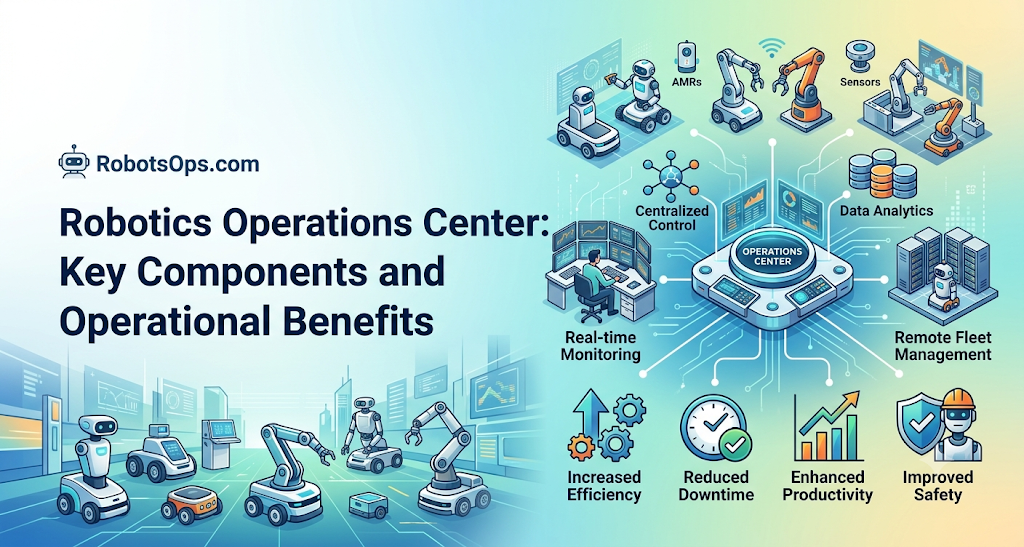
A Robotics Operations Center (ROC) is a centralized operational hub where technical teams monitor, maintain, and triage fleets across multiple facilities. Similar to a Network Operations Center (NOC) in IT or a Security Operations Center (SOC) in cybersecurity, the ROC provides real-time visibility into physical automation systems.
                               +-----------------------------+
                               |     Incident Detected       |
                               | (Drive wheel stalls > 3sec) |
                               +--------------+--------------+
                                              |
                                              v
                               +-----------------------------+
                               |  1. Safe Automatic Action   |
                               |   Motors disable, brakes on |
                               +--------------+--------------+
                                              |
                                              v
                               +-----------------------------+
                               |  2. Central Telemetry Alert |
                               |   ROC dashboard notified    |
                               +--------------+--------------+
                                              |
                                              v
                               +-----------------------------+
                               |  3. Remote Diagnostic Run   |
                               |   Review logs, wheel torques|
                               +--------------+--------------+
                                              |
                       +----------------------+----------------------+
                       |                                             |
                       v                                             v
        +-----------------------------+               +-----------------------------+
        |  Clear: Software Resolution |               |  Unclear: Hardware Fault    |
        | Clear obstacle, resume task |               | Escalate to floor technician|
        +-----------------------------+               +-----------------------------+
Centralized Visibility
The ROC integrates operational signals onto centralized operational dashboards:
- Current operational state (Idle, Navigating, Charging, Error, E-Stopped).
- Key performance metrics like missions completed per hour, battery degradation rates, and mean time between interventions (MTBI).
- Site-level network coverage and communication latencies.
Incident Management Workflow
When a robot reports a critical fault—such as a persistent localization failure or an unexpected joint torque limit—the ROC initiates a structured response:
- Automatic Safety Halt: The robot safely halts motion, applies brakes, and signals its immediate state to surrounding workers using indicator lights.
- Telemetry Ingestion: The robot packages a diagnostic snapshot (recent system logs, transform frames, and error codes) and forwards it to the operations hub.
- Remote Triage: An operator reviews the telemetry snapshot. If the problem is environmental (such as an empty shipping pallet blocking a marked path), the operator can assign a detour route.
- Escalation and Remediation: If the data shows mechanical damage or broken sensors, the ROC dispatches an on-site field engineer with the exact replacement parts required.
- Post-Mortem and Prevention: The engineering team reviews the incident data to refine the software stack, updating simulation suites to prevent similar failures in future releases.
Industrial Robotics vs. Autonomous Mobile Robots
Operational patterns differ substantially depending on whether machines move freely through spaces or stay anchored inside protected workcells.
+-----------------------------------------------------------------+
|                 Industrial vs. Mobile Operations                |
+-----------------------------------------------------------------+
| Fixed Industrial Arms           | Autonomous Mobile Robots (AMRs)
| - Deterministic fieldbus runs   | - Wireless, fluctuating networks
| - Hardwired safety curtains     | - Dynamic local safety scanners
| - Isolated, static workcells    | - Shared human-occupied aisles
| - Low software turnover         | - Frequent map & software updates
+-----------------------------------------------------------------+
Fixed Workcells in Manufacturing
Industrial articulated arms work in tightly defined spaces:
- Predictable Networks: Connected via deterministic industrial Ethernet (EtherCAT, PROFINET), eliminating dropped packets and wireless dead zones.
- Safety Integration: Safety uses physical interlocks, light curtains, and safety PLCs that cut drive power whenever a human enters the cell.
- Maintenance Profile: Work focuses on mechanical lubrication, joint backlash calibration, and repeatable cycle time monitoring.
Mobile Platforms in Dynamic Warehouses
Autonomous Mobile Robots (AMRs) share spaces with personnel, forklifts, and unpredictable clutter:
- Volatile Connectivity: Machines must manage network handoffs between wireless access points without dropping active missions.
- Dynamic Perception: AMRs rely on continuous local sensor fusion (LiDAR, stereo cameras, ultrasonic sensors) to detect obstacles in real time.
- Maintenance Profile: Work targets tire wear, drive caster alignment, sensor window cleaning, and environmental map drift.
Best Practices for Scaling Robot Operations
Deploying ten robots can be accomplished with manual oversight and ad-hoc scripts. Scaling to hundreds across separate customer facilities requires strict operational discipline.
1. Standardize Telemetry Schemas
Do not permit every development sub-team to invent custom logging formats. Enforce uniform diagnostic schemas across all robot models:
- Standardize status flags across subsystems (motors, sensors, navigation, compute).
- Use unified time synchronization (PTP or synchronized NTP) across all compute units, microcontrollers, and cloud logging brokers. Without synchronized clocks, debugging cross-device errors becomes nearly impossible.
2. Automate Release Pipelines
Eliminate manual SSH updates. Every deployment should be repeatable, testable, and recorded:
- Build software containers automatically through version-controlled continuous integration systems.
- Validate every build in simulation before promoting it to physical test fleets.
- Gate production updates behind canary deployments, monitoring health metrics continuously before expanding updates.
3. Maintain Clear Human Escalation Paths
Automation cannot fix every physical challenge. Design workflows with clear escalation tiers:
- Provide operators with clear, unambiguous state displays rather than raw log screens.
- Establish definitive rules for when an issue requires an on-site technician versus a remote software restart.
- Document common recovery procedures so operations teams resolve issues safely and consistently.
FAQ Section
What does RobotOps stand for?
RobotOps stands for Robotics Operations. It is the practice of applying modern software engineering, DevOps principles, automated deployment, and lifecycle monitoring to robotic systems operating in production environments.
How is RobotOps different from traditional DevOps?
DevOps manages software running on uniform cloud servers with reliable wired connections. RobotOps manages software integrated with physical hardware, microcontrollers, and sensors running on edge compute units that face intermittent wireless connectivity and real-world safety hazards.
What is a Robotics Operations Center (ROC)?
A Robotics Operations Center is a centralized technical hub where engineers monitor robot fleets. The ROC tracks fleet health, processes telemetry alerts, manages software deployments, and coordinates responses to unexpected mechanical or navigation failures.
Why is simulation critical in RobotOps?
Simulation acts as the automated testing layer for robotics. It allows engineers to test code updates, navigation logic, and collision avoidance algorithms in virtual environments, discovering software bugs before code is deployed to physical machines.
Can every robot receive Over-the-Air (OTA) updates?
No. OTA update capabilities require compatible hardware and software architecture. Safe updates demand sufficient memory, dual-partition recovery mechanisms, verified bootloaders, and programmatic safety checks that ensure the robot is parked and stationary before installing changes.
What role does ROS 2 play in RobotOps?
ROS 2 provides the underlying communication middleware and modular software framework for modern robotics. RobotOps practices manage the deployment, configuration, logging, and network optimization of ROS 2 nodes running on physical edge machines.
What is the difference between an AMR and an industrial robot in operations?
Industrial robots are stationary arms working in structured cells with wired networks and physical safety barriers. Autonomous Mobile Robots (AMRs) move freely through unstructured, dynamic environments, relying on wireless networks, active sensor fusion, and dynamic path replanning.
What is telemetry in the context of robot fleet management?
Telemetry refers to operational data transmitted by a robot to a central management platform. This includes battery levels, motor currents, system temperatures, Wi-Fi signal strength, localization status, and subsystem error codes.
Conclusion
Robotics has shifted from an era of lab experimentation to continuous field operations. Modern robotics teams cannot rely solely on sound mechanical design and clever navigation algorithms. Long-term commercial success requires operational maturity.
RobotsOps.com provides the framework needed to navigate this transition. By unifying continuous integration, automated simulation, edge telemetry, and centralized fleet management, organizations can scale their fleets reliably. As autonomous systems continue to expand across warehouses, factories, and public spaces, robust robotics operations practices will separate resilient fleets from stranded hardware.

